Build intake that lands in the chart
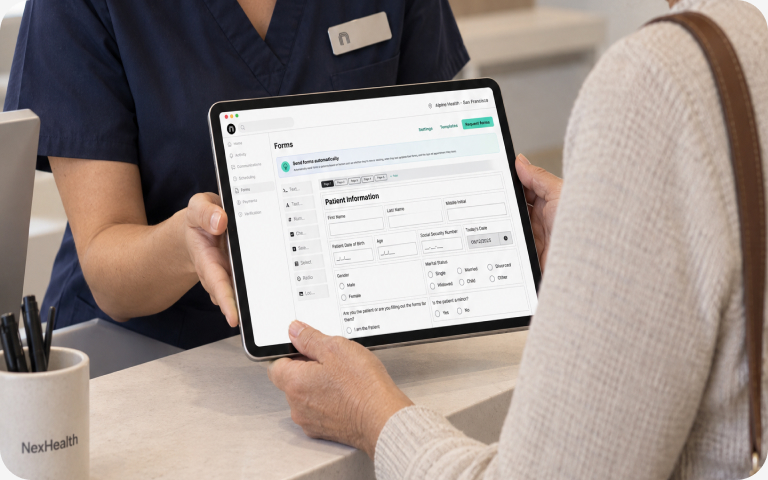
Send forms before the visit and sync the completed answers, consent and insurance back to the patient record.

Send forms before the visit and sync the completed answers, consent and insurance back to the patient record.
Forms done before the visit, filed where the practice looks.
Intake, consent and clinical questionnaires sent before the visit.
Completed responses saved to the patient record and the practice’s document center.
Create and update demographics, contact details and insurance.
Collect the plan and member details and write them to the patient.
Tie every form to the visit it belongs to.
Know when a patient or appointment changes, so you send the right form at the right time.
Your product writes into the system the practice already runs on. Nothing to reconcile.

Completed forms and insurance details sync to the patient record and the document center, so the front desk never re-enters them and the visit starts on time.
See the upload callSartini Dentistry runs intake, online scheduling and reviews on apps built with Synchronizer, and gets 60+ hours a month back.
hours saved a month
of patients book online
of new reviews
One lookup, one upload, and the form is in the chart.
// Find the patient by phone before the visit
const patients = await fetch(
  'https://nexhealth.info/patients?' + new URLSearchParams({
    subdomain: 'your-practice',
    location_id: '100',
    phone_number: '4155550123'
  }), {
  headers: {
    'Authorization': 'Bearer YOUR_TOKEN',
    'Nex-Api-Version': 'v3.0.0'
  }
});
const { data: { patients: [patient] } } = await patients.json();

// File the completed intake form in the chart
const form = new FormData();
form.append('file', pdfBlob, 'intake-2026-11-20.pdf');
form.append('document_type_id', '1');

const doc = await fetch(
  `https://nexhealth.info/patients/${patient.id}/documents?` +
  'subdomain=your-practice&location_id=100', {
    method: 'POST',
    headers: {
      'Authorization': 'Bearer YOUR_TOKEN',
      'Nex-Api-Version': 'v3.0.0'
    },
    body: form
  }
);

// Response
{ "code": true, "data": { "id": 18, "filename": "intake-2026-11-20.pdf", "document_type_id": 1 } }// File the completed intake
// form in the chart
const form = new FormData();
form.append('file', pdfBlob,
  'intake-2026-11-20.pdf');
form.append('document_type_id',
  '1');

const doc = await fetch(
  'https://nexhealth.info' +
  `/patients/${patient.id}` +
  '/documents?subdomain=' +
  'your-practice&location_id=100',
  { method: 'POST',
    headers: {
      'Authorization':
        `Bearer ${token}`,
      'Nex-Api-Version': 'v3.0.0'
    },
    body: form });

// Response
{ "code": true,
  "data": { "id": 18,
    "filename":
      "intake-2026-11-20.pdf" } }# Find the patient by phone before the visit
patients = requests.get(
    'https://nexhealth.info/patients',
    params={
        'subdomain': 'your-practice',
        'location_id': 100,
        'phone_number': '4155550123'
    },
    headers={
        'Authorization': 'Bearer YOUR_TOKEN',
        'Nex-Api-Version': 'v3.0.0'
    }
)
patient = patients.json()['data']['patients'][0]

# File the completed intake form in the chart
with open('intake-2026-11-20.pdf', 'rb') as pdf:
    doc = requests.post(
        f"https://nexhealth.info/patients/{patient['id']}/documents",
        params={'subdomain': 'your-practice', 'location_id': 100},
        headers={
            'Authorization': 'Bearer YOUR_TOKEN',
            'Nex-Api-Version': 'v3.0.0'
        },
        files={'file': ('intake-2026-11-20.pdf', pdf, 'application/pdf')},
        data={'document_type_id': 1}
    )

# Response
{ "code": true, "data": { "id": 18, "filename": "intake-2026-11-20.pdf", "document_type_id": 1 } }# Find the patient by phone
patients = requests.get(
  'https://nexhealth.info/patients',
  params={
    'subdomain': 'your-practice',
    'location_id': 100,
    'phone_number': '4155550123'},
  headers={'Authorization':
    'Bearer YOUR_TOKEN',
    'Nex-Api-Version': 'v3.0.0'})
patient = (patients.json()
  ['data']['patients'][0])

# File the intake form in the chart
pdf = open('intake.pdf', 'rb')
doc = requests.post(
  'https://nexhealth.info'
  f"/patients/{patient['id']}"
  '/documents',
  params={
    'subdomain': 'your-practice',
    'location_id': 100},
  headers={'Authorization':
    'Bearer YOUR_TOKEN',
    'Nex-Api-Version': 'v3.0.0'},
  files={'file': ('intake.pdf',
    pdf, 'application/pdf')},
  data={'document_type_id': 1})

# Response
{ "code": true, "data": { "id": 18,
  "filename": "intake.pdf",
  "document_type_id": 1 } }# Find the patient by phone before the visit
curl -G 'https://nexhealth.info/patients' \
  -d subdomain=your-practice \
  -d location_id=100 \
  -d phone_number=4155550123 \
  -H 'Authorization: Bearer YOUR_TOKEN' \
  -H 'Nex-Api-Version: v3.0.0'
# { "data": { "patients": [ { "id": 55476535, "name": "Jane Doe", ... } ] } }

# File the completed intake form in the chart
curl -X POST \
  'https://nexhealth.info/patients/55476535/documents?subdomain=your-practice&location_id=100' \
  -H 'Authorization: Bearer YOUR_TOKEN' \
  -H 'Nex-Api-Version: v3.0.0' \
  -F 'file=@intake-2026-11-20.pdf;type=application/pdf' \
  -F 'document_type_id=1'

# Response
{ "code": true, "data": { "id": 18, "filename": "intake-2026-11-20.pdf", "document_type_id": 1 } }# Find the patient by phone
API=https://nexhealth.info
TOKEN=YOUR_TOKEN
curl -G $API/patients \
  -d subdomain=your-practice \
  -d location_id=100 \
  -d phone_number=4155550123 \
  -H 'Nex-Api-Version: v3.0.0' \
  -H "Authorization: Bearer $TOKEN"
# { "data": { "patients": [
#   { "id": 55476535, ... } ] } }

# File the intake form in the chart
Q='subdomain=your-practice'
Q="$Q&location_id=100"
U=$API/patients/55476535/documents
curl -X POST "$U?$Q" \
  -H 'Nex-Api-Version: v3.0.0' \
  -F 'file=@intake.pdf' \
  -F 'document_type_id=1' \
  -H "Authorization: Bearer $TOKEN"

# Response
{ "code": true, "data": { "id": 18,
  "filename": "intake.pdf",
  "document_type_id": 1 } }
Create and update patient records, book, reschedule and cancel appointments, post payments and adjustments to the practice ledger, and sync completed intake and consent forms back to the patient record. Clinical data such as treatment plans, clinical notes and procedure histories is there to read as well.
15+ systems. On-premise: Dentrix, Eaglesoft, Open Dental, Dentrix Enterprise, PracticeWorks, Dolphin and OrthoTrac. Cloud: Dentrix Ascend, Cloud9, Curve Hero, Denticon, athenahealth, eClinicalWorks, ModMed and NextGen Office. Every Synchronizer product works on every one of them, through the same endpoints.
For on-premise systems like Dentrix, Eaglesoft and Open Dental, the office runs a self-installer on its server. It takes about 15 to 20 minutes, needs no IT help, and the location shows up in your developer portal once the first sync finishes. For cloud systems like Denticon and Dentrix Ascend, the practice creates a login for NexHealth and adds our browser extension, and our team finishes setup. If a practice already uses NexHealth, they approve your access by email and you’re connected.
$0.10 per API call and $0.05 per webhook delivery. The sandbox is free, and there are no setup fees and no monthly minimums. Higher volumes get custom pricing on the Scale plan.
15+ practice systems, one integration.